

How the scheduler works
When you generate a schedule for plan, Workable tries to create the best possible plan for the time window and people available in your organization.
It looks across the whole plan, tries to satisfy the most important work first, and balances work stream requirements, people capability, timing, and availability. The more clearly you define those inputs, the more useful the generated schedule will be.
It aims to:
- Place work streams in the plan into the available planning periods
- Respect the rules you configured for each work stream
- Assign people who meet the required skills, and any required people or teams
- Keep staffing realistic based on availability and holidays (if used)
- Prioritize higher-ranked work streams when resources are limited
If everything cannot fit, the scheduler will usually favor the work streams that are higher in the priority order and leave lower-priority work streams unscheduled.
The scheduler explores many possible combinations of:
- which work streams to include
- when each included work stream should start
- how long each included work stream should run
- which people should be assigned
It then looks for combinations that satisfy the plan’s constraints. This means the scheduler is not filling work streams one by one from top to bottom. It evaluates the plan as a whole: one decision can affect the feasibility of many others.
Constraints
Section titled “Constraints”A constraint is a rule the scheduler should not break. Common examples include:
- A work stream requires specific team size (number of participants)
- A work stream requires certain skills
- A required person (or team of people) must be included
- A person cannot be committed to overlapping work beyond what the plan allows
- A person cannot be committed during periods where they are unavailable
- A work stream can only run for one of its allowed durations
Some constraints are effectively mandatory. If they cannot all be satisfied together, the scheduler may leave a work stream out of the schedule, or notify you that the plan is infeasible.
Priorities
Section titled “Priorities”Priority is one of the strongest signals in the plan.
If you have more demand than capacity, the scheduler will generally try to protect the higher-priority work streams first. Lower-priority work streams may be delayed, shortened within their allowed options, or left unscheduled if there is not enough qualified capacity remaining.
This is why the order of work streams in the plan matters. Moving a work stream higher can change what gets scheduled across the entire plan.
See Work stream priority for how to change work stream priorities in a plan.
Skills
Section titled “Skills”Skill requirements tell the scheduler what kind of people a work stream needs. In broad terms, the scheduler:
- checks whether the organization has people with the required skills
- considers when those skills are needed
- tries to assign people who match the required capability
- avoids assigning people where the fit is clearly wrong when a better fit exists
If you use specific periods for a skill requirement, the scheduler treats that as timing information about when that capability matters within the work stream, not just whether the work stream needs that skill at all.
People
Section titled “People”Each person is treated as a limited resource. The scheduler considers:
- whether the person is active
- what skills they have
- whether they are required in a work stream
- whether they belong to a required team
- whether they are already committed elsewhere in the same periods
- whether they are unavailable because of holidays or scheduled time off
The goal is to create committed assignments that are feasible across the full plan, not just on one work stream in isolation.
Required people, required teams, and consultants
Section titled “Required people, required teams, and consultants”These assignment types are treated differently:
- Required people are hard commitments. If you require someone in a work stream, the scheduler must work around that choice.
- Required teams are expanded into their members and treated similarly to fixed work stream requirements.
- Consultants provide visibility and context, but they are not counted as committed delivery capacity for team-size validation or core staffing requirements.
Holidays and availability
Section titled “Holidays and availability”If holiday options are enabled, the scheduler treats those periods as unavailable for committed work for relevant people. This can change:
- when a work stream can start
- whether a work stream can run continuously
- whether enough qualified people exist in a given period
- whether a work stream can be scheduled at all
This is one reason a work stream that looks feasible in a simple headcount review may still fail to schedule in practice.
What “best possible” means in practice
Section titled “What “best possible” means in practice”The scheduler is trying to find a strong overall plan, not just satisfy one rule at a time. In practice, that usually means it prefers outcomes that:
- schedule more important work streams
- respect configured constraints
- use qualified people where they are needed
- avoid obvious assignment conflicts
- keep work streams reasonably coherent over time
Two important consequences follow from this:
- A valid schedule will not always be the same as the schedule you expected.
- Changing one work stream can change the schedule for many others.
Why work streams can remain unscheduled
Section titled “Why work streams can remain unscheduled”A work stream may remain unscheduled for several different reasons:
- Higher-priority work streams consumed the available people first
- The required skills do not exist in the organization
- The work stream needs more people than are available
- Required assignments created conflicts
- Holidays or time off reduced or removed critical availability
- The work stream’s duration and staffing rules leave too little flexibility
When this happens, Workable provides specific feedback about each work stream that could not be scheduled:
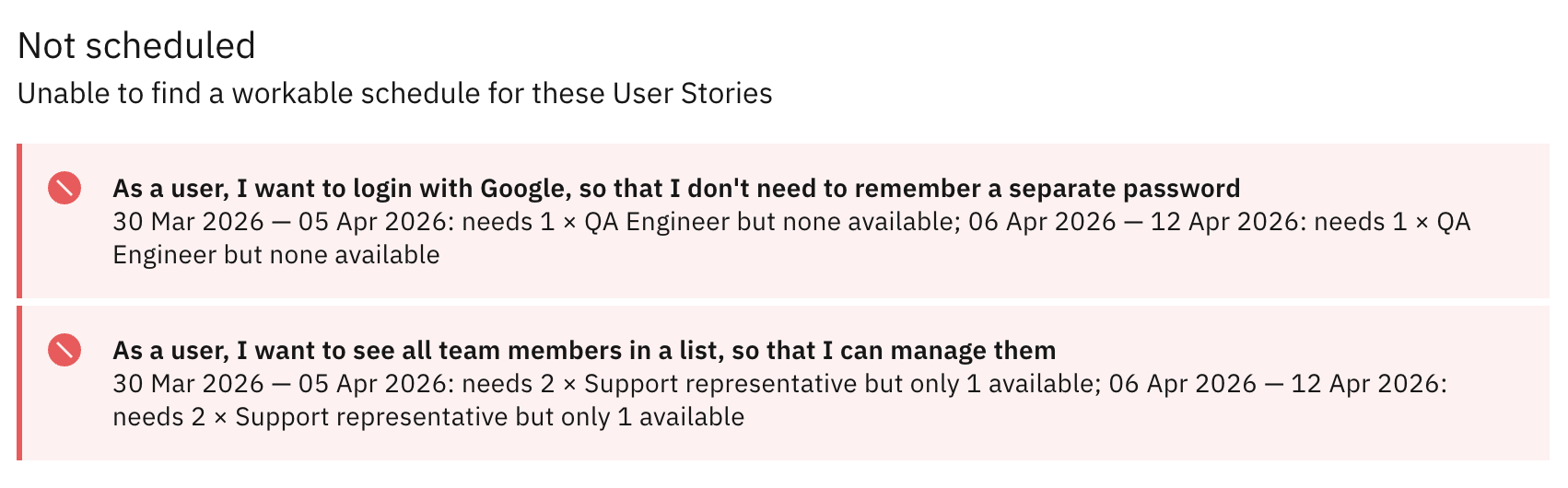
An unscheduled work stream does not always mean the plan is broken. Sometimes it means the scheduler made a tradeoff in favor of higher-priority work.
Why a plan can become “infeasible”
Section titled “Why a plan can become “infeasible””Sometimes there is no valid way to satisfy the required constraints. This can happen when, for example:
- the same person is required on conflicting work
- a required skill is unavailable in the periods where it is needed
- team-size rules and skill requirements cannot be satisfied together
- time-off rules remove too much capacity
When this happens, Workable provides validation or scheduling feedback so you can identify the constraint that needs to change.
For the best results
Section titled “For the best results”The scheduler works best when it has accurate inputs and some room to make tradeoffs. You will usually get better schedules when you:
- keep work stream priorities intentional and up to date
- define skill requirements clearly
- use required people and team assignments only when they are truly necessary
- keep people skills and holiday data accurate
- give work streams realistic duration and team-size settings
- use scenarios to compare alternative setups before changing your baseline
For information about possible validation and scheduling issues, see Troubleshooting schedules.