

Holiday options
This guide explains how Workable handles location-based public / legal holidays and person-specific scheduled holidays when building schedules.
Public / legal holidays
Section titled “Public / legal holidays”Add a Country and optionally State / Region to a person in People Resources. This unlocks the option to automatically consider published public/legal national and regional holidays for that person when building schedules.
These options may be applied when scheduling, on a per-plan basis:
- If Country is blank, public/legal holidays are not considered for that person when building a schedule
- If Country is set for a person, Workable will consider national holidays that apply to that person
- If State / Region is left blank (or none are available for a country), Workable will only consider national holidays
- If State / Region is set for a person, Workable will consider national, regional, and local holidays that apply to that person
Supported Countries
Section titled “Supported Countries”Afghanistan, Albania, Algeria, American Samoa, Andorra, Angola, Anguilla, Antigua and Barbuda, Argentina, Armenia, Aruba, Australia, Austria, Azerbaijan, Bahrain, Bangladesh, Barbados, Belarus, Belgium, Belize, Benin, Bermuda, Bhutan, Bolivia, Bosnia and Herzegovina, Botswana, Brazil, British Virgin Islands, Brunei, Bulgaria, Canada, Chile, China, Colombia, Costa Rica, Croatia, Cuba, Cyprus, Czech Republic, Denmark, Dominican Republic, Ecuador, Egypt, France, Germany, India, Italy, Japan, Mexico, Netherlands, New Zealand, Norway, Poland, Portugal, Spain, Sweden, Switzerland, United Kingdom, United States, Uruguay, Vietnam, Zimbabwe
Scheduled holidays
Section titled “Scheduled holidays”Scheduled holidays account for person-specific time off such as vacations, PTO, sick leave, or training days. Configure them in People Resources. Scheduled holidays are personal. They do not depend on, but are complementary to, country and state / region holidays.
Holiday scheduling policies
Section titled “Holiday scheduling policies”Holiday scheduling policies are configured in each plan in Plan Settings ➔ Holiday policies. They can be modified per Scenario in a plan.
| Assign people on legal holidays | Assign people on their scheduled holidays | Impact on scheduling |
|---|---|---|
Not allowed | Not allowed | Workable blocks both public holidays and scheduled holidays. |
Allowed | Not allowed | Workable ignores public holidays but still blocks scheduled holidays. |
Not allowed | Allowed | Workable ignores holiday constraints for that schedule. In practice, people can still be assigned on both public and scheduled holidays. |
Allowed | Allowed | Workable ignores all holiday constraints for that schedule. |
Holiday sensitivity
Section titled “Holiday sensitivity”The Holiday sensitivity option in a plan changes how public and scheduled holidays are considered when generating schedules:
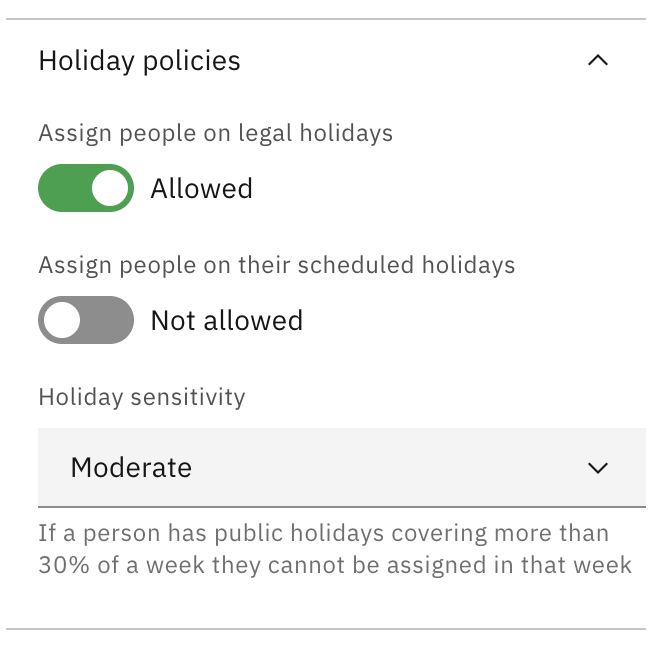
| Sensitivity | Effect |
|---|---|
Strict | Any holiday in the relevant period keeps that period blocked |
Moderate | A period stays blocked only when holidays cover more than 30% of that period or, for Day plans, more than 30% of the full plan |
Flexible | A period stays blocked only when holidays cover more than 50% of that period or, for Day plans, more than 50% of the full plan |
Low | A period stays blocked only when holidays cover more than 75% of that period or, for Day plans, more than 75% of the full plan |
Examples:
- On a Week plan, one single-day holiday is about 14% of the week. That blocks the week on Strict, but not on Moderate, Flexible, or Low.
- On a Month plan, one single-day holiday is usually too small to block the whole month unless the sensitivity is Strict.
- On a 30-day Day plan, 2 holidays cover about 7% of the plan, so they are ignored on Moderate, Flexible, and Low, but remain blocked on Strict.